Project overview: IOC Toolkit is a lightweight browser extension I built to reduce the repetitive friction SOC analysts and threat hunters face when moving from a highlighted indicator to enrichment across trusted threat intelligence platforms.
Introducing IOC Toolkit: Streamlining Cyber Threat Intelligence Gathering
In the fast-paced world of cybersecurity, time is of the essence. When analyzing potentially malicious activity, Security Operations Center (SOC) analysts and threat hunters frequently encounter Indicators of Compromise (IOCs)—such as suspicious IP addresses, domain names, or file hashes.
To determine the threat level of an IOC, an analyst typically has to copy the indicator, strip away any protective formatting (a process known as “refanging”), and paste it into multiple Threat Intelligence (TI) platforms. Doing this dozens of times a day is tedious and breaks concentration.
Enter the IOC Toolkit, a lightweight, highly efficient browser extension designed to eliminate this friction entirely.
How IOC Toolkit Solves the Problem
The IOC Toolkit transforms a multi-step, manual process into a simple right-click. Once installed in your browser, it adds a dedicated context menu that allows you to instantly query highlighted IOCs across the industry’s most trusted security databases.
Key Features
- Automatic Refanging On-the-Fly
Security professionals often “fang” malicious indicators to prevent accidental clicks, such as writinghXXp://badsite[.]cominstead of a live URL. IOC Toolkit automatically refangs the text before searching. It seamlessly converts[.]to.,hXXptohttp,[@]to@, and strips brackets, ensuring your query works perfectly on the destination site without manual editing. - Extensive Threat Intel Integrations
Why limit yourself to one source? IOC Toolkit natively supports direct queries to a wide array of premium threat intel services:
- VirusTotal
- AbuseIPDB
- URLScan.io
- Cisco Talos
- MS Defender TI
- Whois.com
- IBM X-Force
- Hybrid Analysis
- Kaspersky OpenTip
- The Power of “Check All”
When facing a highly critical incident, you can select “Search All Services” to instantly open tabs for every single configured source. This parallel investigation capability drastically cuts down the time required to build a comprehensive threat profile.
Visualizing the Workflow
Here is how IOC Toolkit accelerates the threat hunting workflow from highlighted text to enrichment results:
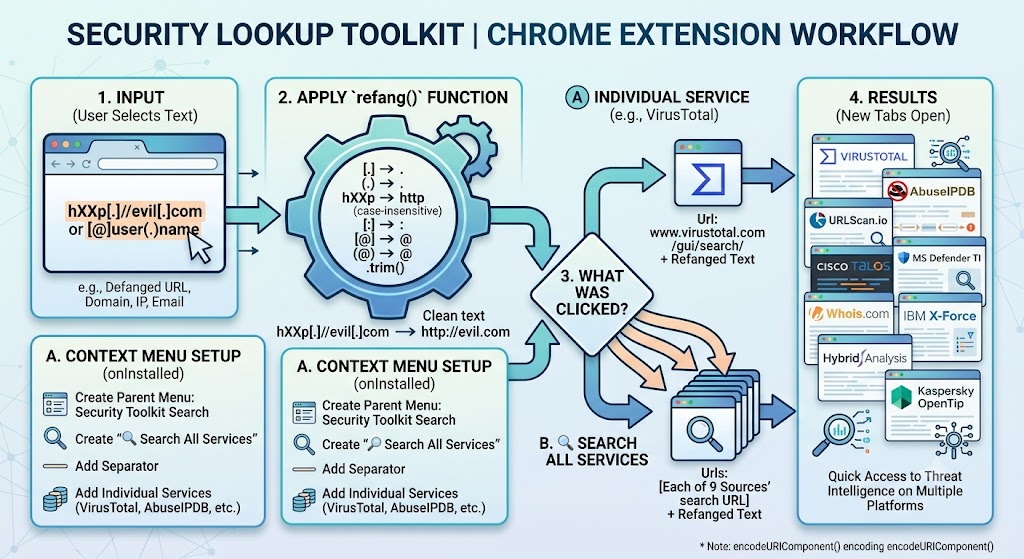
Under the Hood
The extension is beautifully simple yet powerful. Built using modern Chrome Extension capabilities (Manifest V3), it relies on a streamlined background.js service worker.
Because it operates on the contextMenus permission, it is incredibly lightweight and only activates exactly when you need it—no bloated background processes or unnecessary site permissions required.
Analyst Tip: You can use IOC Toolkit on any text, anywhere on the web. Whether you’re reading a threat report, analyzing a raw log in a web console, or reviewing a SIEM alert, simply highlight the IOC and right-click to let the toolkit do the heavy lifting.
Conclusion
The IOC Toolkit is an open-source force multiplier for any cybersecurity professional. By automating the repetitive tasks of refanging and multi-source querying, it allows analysts to focus on what really matters: understanding the threat and defending the network.
If you’re interested to try this here is the link: https://chromewebstore.google.com/detail/bfjejfbbnoodmmcoglhplgllnofcmmgo
Kindly rate and please leave a comment for any suggestions or feedback.
Thank you!
Regards,
</Russel>