If you’ve spent any time working in offensive security or managing an organization’s perimeter, you probably know the drill: run some scans, comb through thousands of lines of output, find 500 “critical” vulnerabilities that are actually false positives, sigh heavily, and start filtering.
I was tired of that cycle. So, I decided to build something different.
Today, I want to share a project I’ve been working on—an External Attack Surface Management (EASM) and Threat Intelligence Platform. It strings together some of the best open-source security tools out there, but with a twist: it uses a locally hosted Large Language Model (LLM) to make sense of the noise without sending sensitive vulnerability data to the cloud.
Let’s dive into how it works.
The Problem with “Dumb” Scanners
Traditional vulnerability scanning is a double-edged sword. Tools like Nuclei, Amass, and Naabu are incredibly powerful. They can rip through subdomains and port scans at lightning speed. The problem isn’t getting the data; the problem is what happens next.
When you chain these tools together, you end up with massive JSON blobs of findings. A typical automated pipeline will dump these into a Slack channel or Jira board, overwhelming engineers with raw alerts. Most of these alerts are informational, duplicate, or contextless.
I wanted a system that could:
- Discover the attack surface automatically.
- Scan for vulnerabilities and misconfigurations.
- Analyze the results using AI to filter noise.
- Report clean, executive-friendly summaries to a vulnerability management dashboard.
The Architecture: Bringing It All Together
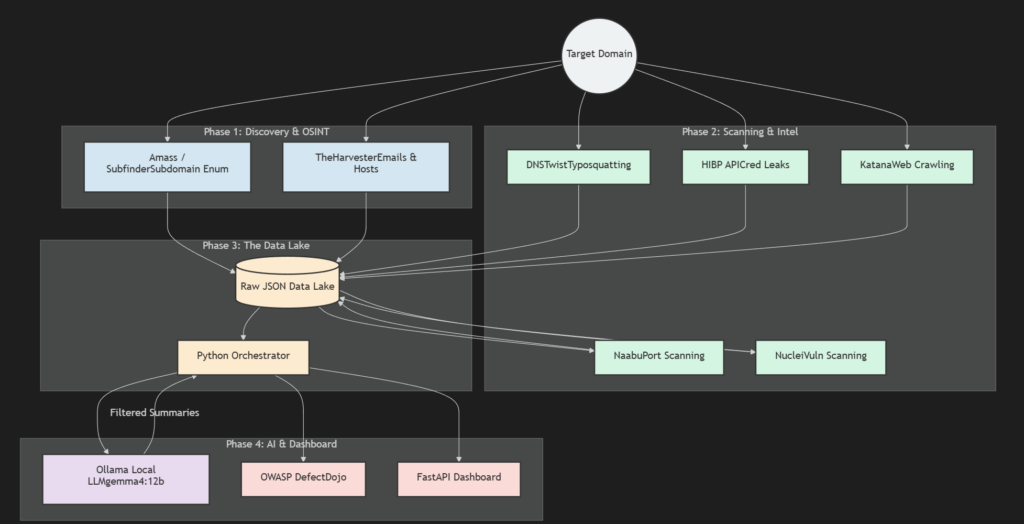
Here’s a high-level look at how the data flows through the platform.

Architecture Diagram
The system is designed around a microservices-inspired data pipeline. A Python orchestrator (scan.py) fires up containerized scanners in parallel, aggregates their outputs, and saves everything to a local JSON data lake. Then, the analysis engine (analyze.py) takes over, feeding the data to a local AI and ultimately pushing it to OWASP DefectDojo.
Here is a detailed breakdown of the workflow:
The Secret Sauce: Local AI with Ollama
This is the part I’m most excited about.
Sending vulnerability data to public AI APIs like ChatGPT or Claude is often a massive no-go for enterprise environments. You don’t want to inadvertently train public models on your zero-days or internal network misconfigurations.
To solve this, I integrated Ollama running the gemma4:12b model locally.
When the analyze.py script runs, it grabs the complex Nuclei findings and asks the local LLM to do three things:
- Identify if the finding is a likely false positive based on the context.
- Write a brief executive summary (for leadership).
- Generate a technical remediation snippet (for engineering).
Because the LLM runs locally on your own hardware, your scan data never leaves your network.
Unified Vulnerability Management
Nobody likes reading JSON. To make the data actionable, the orchestrator normalizes the AI-enriched findings and pushes them directly into OWASP DefectDojo via its API.
DefectDojo acts as the single pane of glass, tracking how vulnerabilities evolve over time across multiple engagements.
I also built a lightweight FastAPI web interface for the platform. If I just want a quick look at the asset inventory or a snapshot of open ports without digging into DefectDojo, I can just spin up the FastAPI server.
Getting Started
If you want to build something similar or try the pipeline out, it’s designed to be heavily containerized so it won’t pollute your host machine.
Here’s how easy it is to kick off a scan:
bash# Start the local AI model in the backgroundollama run gemma4:12b# Run the reconnaissance and scanning phasepython scan.py --domain example.com# Run the analysis, trigger AI summaries, and push to DefectDojopython analyze.py --domain example.com
And to view the native dashboard:
bashuvicorn app.main:app --reload
What’s Next? (The Roadmap)
Right now, this runs perfectly on a decent workstation (you’ll need about 16GB of RAM if you want the 12b LLM model to be snappy). But I built the architecture with scalability in mind.
My next steps are:
- Distributed Queues: Moving from simple Python thread pools to Celery + Redis so I can distribute scan workers across multiple VPS instances.
- Object Storage: Swapping the local JSON
./data/directory for an S3-compatible backend like MinIO. - Multi-Tenancy: Updating the SQLAlchemy models to support true multi-tenant data segregation, making it closer to a SaaS product.
Have you ever tried integrating LLMs into your security workflows? I’d love to hear how you are handling the noise. Let me know in the comments!
(Disclaimer: Always ensure you have explicit permission before scanning any infrastructure.)